
1. AI that digitizes your tools and understands your questions
Entering custom tools by hand used to be one of the slowest jobs in tool management. Since May, it takes a file. Instant Tool Ingestion reads a manufacturer PDF cut sheet, a technical drawing image or a product URL. It then imports the tool into My Inventory, with AI extraction that maps the spec sheet to standard ISO tooling properties.
The AI work continued through the year:
- Refresh Data fills custom tools with current catalog properties and technical links. In September it began querying manufacturer part databases directly to complete missing ISO parameters.
- Search with Chuck lets users find tooling by describing what they need in plain language.
- AI search with filters combines natural-language queries with catalog property filters. Users get the speed of a conversation and the precision of a parametric search.
The result: less typing and fewer data gaps, so you can find the right tool faster.
2. From catalog to crib to machine pocket
In 2026, My Inventory went from a tool list to a map of the shop floor. Each release added detail about where each tool is and what it is used for.
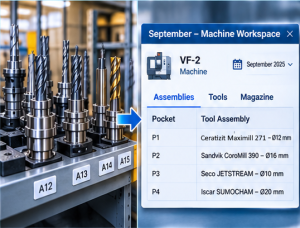
- Faster onboarding: importing a GTC tooling package now creates complete inventory items automatically. Manufacturer catalog items can be edited in-app, and quick search works across shared organization inventories.
- Physical locations: tools and assemblies can be assigned to shop-floor cribs, racks and storage bins.
- Shop-floor visibility: tool numbers and customer part numbers appear in My Tools, workshop tables and the Tool Assembly workspace. Grids update live when item data is uploaded.
- Machine pocket assignment: assemblies can be assigned to specific magazine pockets, and workholding to machine tables and fixtures. Redesigned machine pages show physical tool locations first.
- Job lifecycle states: a new State field tracks each job from planning to production. Teams can move items between folders and import lists of assemblies from .txt files.
Safeguards such as duplicate part number alerts (March) keep this data clean as it grows.

3. A faster Tool Advisor that knows your shop
Tool Advisor recommends tooling for a machining feature. This year it got faster, and its recommendations now reflect what each shop already owns.
- Work while it searches: long multi-feature queries run in the background through the Download Manager, and results are kept for 30 days. Since June, users can explore results while strategy queries are still running.
- Smarter results: preferred machining rules rank first, and Advisor flags partial inventory matches when a complete assembly isn’t available.
- Speed at scale: Advisor pages through results from several brands at once and skips a slow ranking step on large result sets. New features inherit the job’s workpiece material automatically.
- Your inventory first: Filter by My Inventory limits recommendations to the tools and assemblies a company already owns.
- Closer to purchase: users can filter by brand, order directly from the manufacturer on recommendation cards, and import feature definitions from JSON. If a search returns nothing, Request Missing Item alerts the catalog team.
4. Deeper, more accurate CAM integrations
Every release in 2026 improved how jobs reach CAM. Exports now carry more data, and the 3D geometry is more precise.
|
CAM system |
Highlights in 2026 |
|---|---|
|
SolidCAM |
Links back to MachiningCloud items in XML exports; CCR, LCR and RCR parameters for turning; better insert seating; turning cartridge export; solid cutters as native parametric shapes instead of meshes |
|
hyperMILL |
Thread-milling mappings, automatic inch/metric units, woodruff slot-mill support, native collet couplings |
|
ESPRIT EDGE |
Cleaner exported items; high-resolution 3D render images added to CAM tool libraries |
|
Zoller, GibbsCAM, Autodesk Fusion |
Updated presetting adapters, improved tool-transfer definitions, corrected holder gauge lengths |
Three additions apply to every CAM system:
- Multi-operation feeds and speeds: XML exports can carry feed and speed values for each operation and feature in a job.
- Batch item export: several standalone tools can be exported in one package without building assemblies first.
- Custom tool feeds and speeds engine: calculates cutting data for user-defined tools.
The 3D models behind these exports also improved. Cutting reference points, insert mating and left- and right-hand orientation were corrected, and die-sinking, V-groove, stylus-ball and modular tooling now render more accurately.
5. A bigger, richer catalog
In 2026, MachiningCloud added new brands and enriched the data for brands already on the platform.
- New production catalogs: 5th Axis workholding and XEBEC surface finishing; WIDIN, Schüssler, and NS Tool.
- Richer data: Sandvik Coromant material hardness ranges for feeds and speeds, Iscar 2026 workpiece materials, Moldino/Hitachi cutting data, and automatic connection codes for LMT Onsrud modular assemblies, and a full Ceratizit release with complete GTC data structures and workpiece materials
- Ongoing refreshes: updated data for Walter, Seco, Mitsubishi, OSG, Dormer Pramet, Emuge, IMC Group and others.
What’s next
The groundwork for the next step is already in place. October’s release added backend support for assigning tools to machine spindles and magazine pockets. A new modular Job Report engine is also on the way.